Senegal Software — CRM Design System
As Design System Lead within the broader product team, my responsibility was to architect and build the design system layer that would sit beneath all active product design work
Role
Design System Lead — responsible for establishing the component library, token architecture, and design standards across the CRM product
Industry
Recruitment SaaS platform serving commercial, healthcare, finance, IT, and event staffing industries
Duration
Ongoing

Context & Challenge
Senegal Software is an enterprise-grade staffing and recruitment platform with a broad and deeply complex product surface — spanning 14+ feature modules including CRM, event staffing, talent management, agreements, finance, reporting, marketing automation, and third-party integrations. Each module serves distinct user types: recruiters, agency managers, finance teams, and enterprise clients.
Designing for this scale without a unified system creates predictable problems: inconsistency across screens, duplicated effort between designers and engineers, slower iteration cycles, and a fragmented experience for users navigating between modules.
The Core Problem
There was no single source of truth for design decisions across the product. Without a shared foundation — common components, consistent tokens, and agreed-upon patterns — each module risked diverging visually and functionally. For an enterprise CRM where users spend hours inside the product every day, inconsistency isn't just an aesthetic issue. It increases cognitive load, reduces trust in the interface, and slows down new feature development.
What Was Needed
– A scalable component library that could serve 14+ distinct modules without becoming rigid or brittle
– A design token system that would allow global changes — colour, spacing, typography — to propagate consistently across the entire product
– Components that reflected the real complexity of enterprise CRM interactions: dense data tables, multi-step workflows, nested filters, form-heavy interfaces, and role-based UI states
– A system that designers and engineers could both work from — reducing handoff ambiguity and building shared language across the team


My Role & Responsibilities
As Design System Lead within the broader product team, my responsibility was to architect and build the design system layer that would sit beneath all active product design work — establishing the foundation that every screen would be built on.
What I Led
– Audited existing UI patterns across the CRM to identify inconsistencies, redundant components, and gaps — creating an inventory of what existed before anything was standardised
– Defined the token architecture: structured naming conventions for colour, typography, spacing, elevation, and state tokens that mapped directly to engineering variables
– Built the Figma component library from the ground up — covering core UI primitives (buttons, inputs, badges, chips, tooltips, modals) through to complex CRM-specific components (data tables, kanban pipelines, filter panels, sidebar navigation, and multi-step form flows)
– Established component variants and states — covering default, hover, focus, disabled, loading, error, and empty states for every component, ensuring nothing was left undefined for developers
– Created usage documentation within Figma — naming conventions, do/don't guidance, and notes on component behaviour at different breakpoints
– Worked closely with engineers to ensure token naming aligned with their implementation approach, reducing the gap between design intent and built output
– Maintained and versioned the library as the product evolved — deprecating outdated patterns and introducing new components as new modules were scoped


Key Design Decisions
1. Token-First Architecture
Rather than hardcoding values into components, every visual decision in the system — colour, spacing, border radius, shadow, typography size — was expressed as a named token. This meant that a single change to a token (e.g. the primary brand colour or the base spacing unit) would propagate across every component simultaneously. For an enterprise product with long development cycles, this was non-negotiable: the system had to support change without requiring a manual component-by-component update.
Tokens were structured in two tiers: primitive tokens (raw values — the actual hex, pixel size, or font weight) and semantic tokens (purpose-driven references — 'colour/surface/primary', 'spacing/component/gap/md'). Semantic tokens reference primitives, meaning a design decision and its rationale are always coupled together.
2. Designing for Data Density
Staffing CRMs are inherently data-heavy. Recruiters work with large candidate tables, multi-column dashboards, and deeply nested filters. The component library was built with information density as a first-class concern — not as an afterthought. This meant designing compact variants of tables, form fields, and navigation elements that remained readable and usable at tighter spacings, rather than defaulting to a spacious consumer-app aesthetic that would feel wrong in a professional CRM context.
3. Component Scope & Naming
One of the most important early decisions was defining component scope — what counts as one component versus two, and when to use variants versus separate components. For the Senegal system, components were scoped around user intent rather than visual similarity. A data table row and a card both display information, but they serve different interaction patterns and were kept as distinct components. Naming followed a consistent taxonomy: [Category]/[Component]/[Variant], making the library intuitive to navigate even as it grew.
4. Accounting for Role-Based States
Senegal Software serves multiple user roles within the same interface — agency managers, recruiters, talent coordinators, and clients each have different permissions and therefore different UI states. The component system was designed to accommodate this: read-only variants, locked states, and permission-gated interactions were all built into the component spec from the start, rather than being bolted on later.
The Outcome
The design system established a shared language for the entire Senegal CRM product — connecting design decisions to engineering implementation through a structured token layer, and providing the product team with a component library capable of supporting the platform's full feature complexity.
What Was Delivered
– 200+ Figma components covering every major UI pattern across 14 product modules — from core inputs and navigation to CRM-specific patterns like pipeline stages, shift grids, and agreement modals
– A two-tier token system (primitive + semantic) with full coverage of colour, typography, spacing, elevation, and interactive states — structured for direct alignment with engineering variables
– Documented component states including default, hover, focus, active, disabled, loading, error, and empty — eliminating ambiguity in developer handoff
– Compact and default density variants for data-heavy components, enabling the UI to adapt to different user workflows without losing visual consistency
– A versioned library that could be updated centrally and propagate across all active design files — reducing duplication and keeping the product in sync as it scaled
Impact on the Product Team
– Reduced designer time spent on repetitive UI decisions — components could be assembled from the library rather than rebuilt per screen
– Improved design-to-engineering handoff clarity — token naming aligned between Figma and code meant developers could implement with confidence
– Established a consistent visual language across all 14+ modules, reducing the cognitive load for users navigating between different areas of the platform
– Created a foundation for future scaling — new modules could be designed using existing components rather than requiring new patterns each time
Reflection
Design systems work is unglamorous in the traditional sense — there are no hero screens or headline interactions. What makes it meaningful is the multiplier effect: every component built correctly, every token named consistently, pays forward across hundreds of screens and thousands of user interactions. For a product as complex as Senegal Software — where recruiters and agency managers spend their working day inside the platform — a coherent, predictable interface isn't a nice-to-have. It directly affects how efficiently people can do their jobs.
The most important lesson from this project was that a design system is never just a component library. It's a set of decisions made in advance, on behalf of the whole team. Getting those decisions right — especially the token architecture and component scoping — compounds over time. Getting them wrong compounds just as quickly. The investment in thinking carefully at the foundation level is what makes the system worth having.
What I'd Do Differently
With more time, I would have introduced a dedicated usage documentation site alongside the Figma library — a space where design rationale, accessibility notes, and engineering implementation guidance lived together. Figma annotations are useful, but a living documentation layer would reduce onboarding time for new team members and make the system easier to maintain long-term.
Other projects

LuxeGuide — Luxury Travel Platform
End-to-End Design: Brand Identity, Information Architecture, Wireframes & Full UI for a Premium Travel Website and Admin Panel

AI-Powered Clinic Management Landing Page
I designed a clean, modern and user-centered, full marketing landing page — the primary conversion surface for the product.
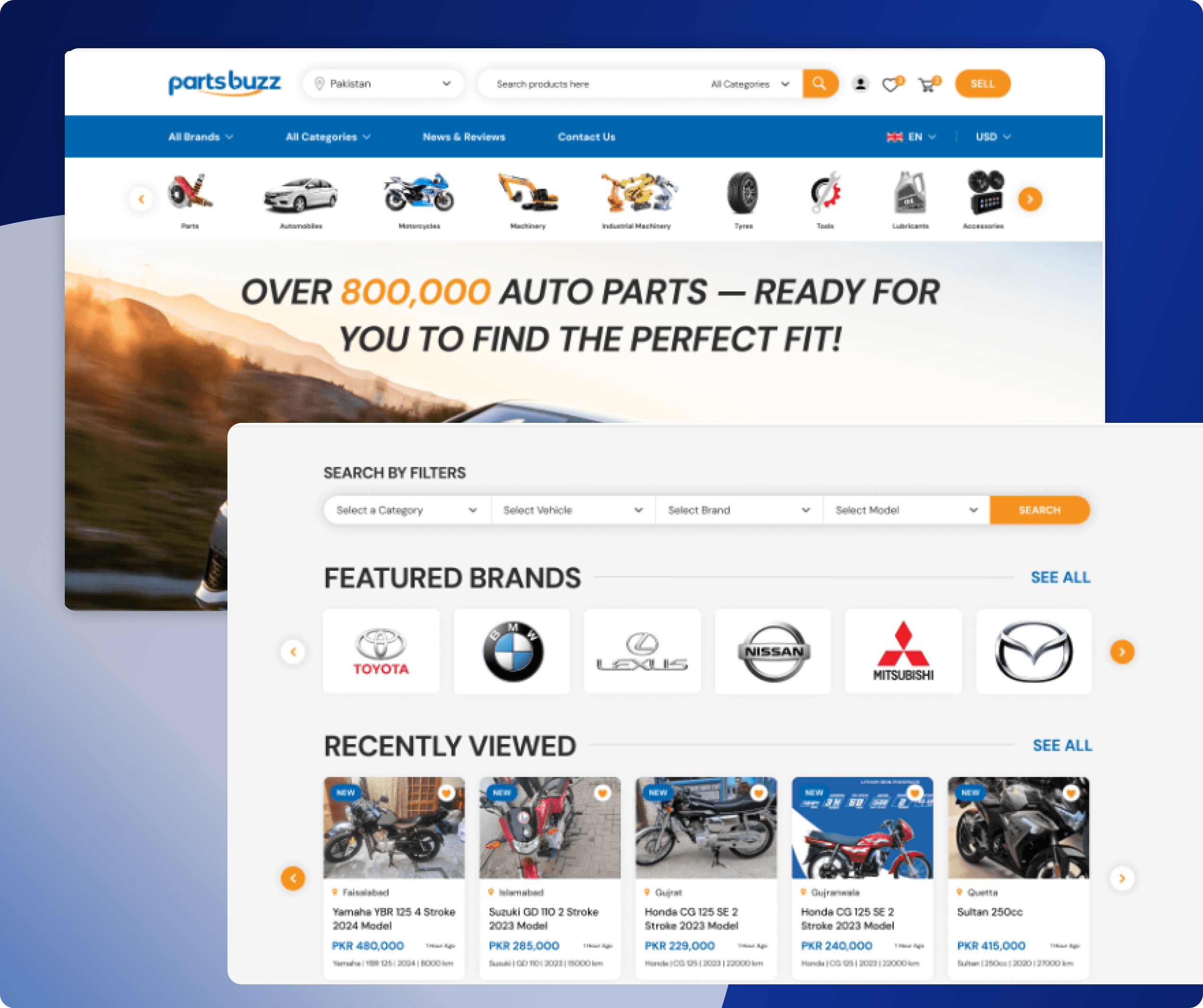
Automotive Marketplace Redesign
PartsBuzz is a global automotive marketplace for buying and selling auto parts, vehicles, machinery, tools, tyres, lubricants, and accessories. The platform supports a large inventory across multiple categories and serves both buyers and sellers worldwide.

Drift — Smart Food Ordering App
Drift is a mobile food ordering app designed to help users order meals before arriving at a restaurant. The goal was to reduce waiting time and create a smoother pickup experience for busy users.